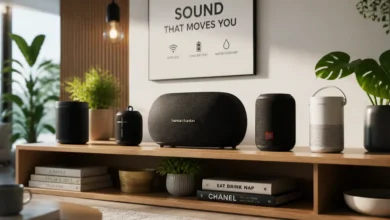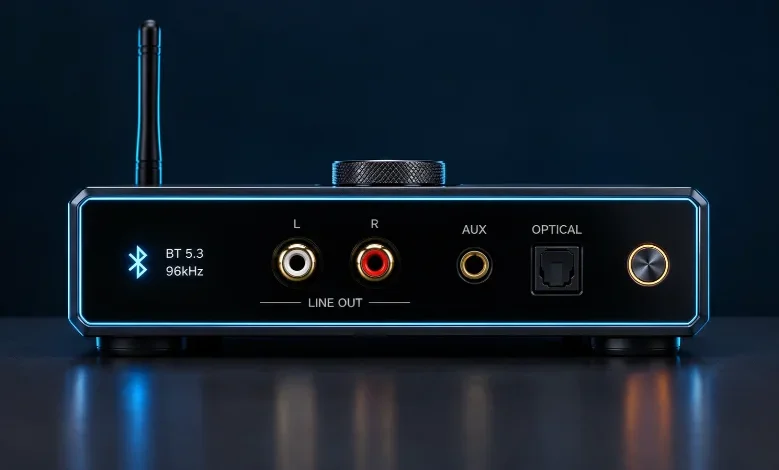
A Bluetooth receiver can bring wireless audio to speakers, stereos, cars, and headphones that still rely on cables. You connect the adapter to your existing audio equipment, then pair a phone, tablet, or computer. The right model can extend useful equipment without forcing you to replace an entire sound system.
| Key point | What to know |
|---|---|
| Main purpose | Receives wireless audio and sends it to connected audio equipment |
| Common outputs | 3.5mm AUX, RCA, optical, coaxial, or USB |
| Common uses | Home stereos, cars, powered speakers, headphones, and older audio equipment |
| Important features | Output type, codec support, range, power, multipoint, and latency |
| Receiver vs transmitter | A receiver accepts Bluetooth audio; a transmitter sends audio over Bluetooth |
| Best buying strategy | Match your equipment’s input first, then compare audio features |
Quick answer: A Bluetooth audio receiver adds wireless playback to equipment that lacks built-in wireless audio. Your phone sends music to the adapter. The adapter then feeds that sound into your stereo, speaker, car system, or headphones through a compatible wired connection.
What Is a Bluetooth Receiver and What Does It Do?
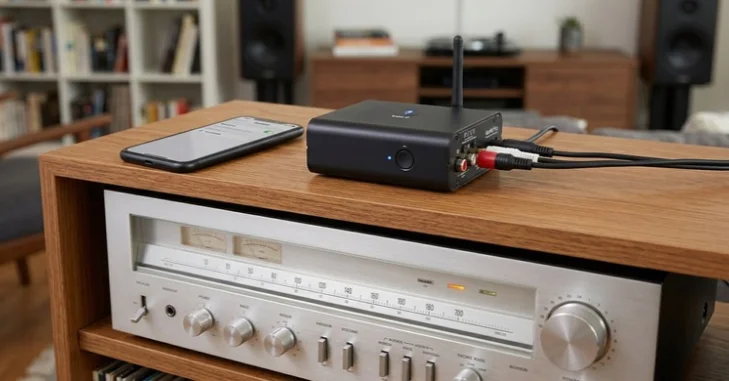
A Bluetooth receiver is a wireless audio receiver that acts as the listening side of a Bluetooth connection. Your phone or computer sends the audio, while the adapter receives and converts it. The resulting signal then travels through a cable into your existing audio equipment.
This setup is especially useful for older equipment that still sounds good. You can keep a vintage amplifier, powered speakers, or an older car stereo. Adding a small adapter can provide modern wireless playback without replacing those devices.
Bluetooth Classic audio commonly uses the A2DP profile for stereo audio distribution. The Bluetooth SIG defines A2DP requirements for interoperable high-quality audio distribution.
How Bluetooth Audio Reception Works
The process starts when your source device searches for nearby compatible equipment. You select the adapter from the Bluetooth menu and complete pairing. Future connections may occur automatically after both devices remember each other.
Music is compressed using a supported Bluetooth audio codec before transmission. The receiving adapter decodes that stream and produces an audio signal. Its output then carries the sound into your amplifier, speaker, headphones, or car stereo.
The final result depends on more than the wireless connection alone. Your source, codec support, receiver electronics, cables, amplifier, and speakers can all affect playback. A costly adapter cannot correct limitations elsewhere in the audio chain.
Readers interested in digital media can also review TechZena’s guide to the MP4 media format. Bluetooth codecs and media file formats serve different purposes, although both influence digital audio playback.
Receiver vs Transmitter: Know Which Device You Need
Receiver and transmitter products may look nearly identical, which creates easy buying mistakes. Their signal direction is different, so they solve opposite problems. Some adapters support both roles through separate RX and TX modes.
| Device type | Audio direction | Typical example | What to look for |
|---|---|---|---|
| Receiver | Wireless source to wired equipment | Phone to old stereo | RX or receiver mode |
| Transmitter | Wired source to wireless equipment | TV to Bluetooth headphones | TX or transmitter mode |
| TX/RX adapter | Either direction | Multi-purpose home setup | Selectable TX and RX modes |
Choose a receiver when sound starts on your phone and needs to reach wired equipment. Choose a transmitter when sound starts from a wired television, console, or stereo. A dual-mode product can make sense when you expect to use both configurations.
This distinction should come before Bluetooth version, range, or codec comparisons. Buying the wrong signal direction makes every other specification irrelevant. Check the product’s connection diagram before ordering.
Where a Wireless Audio Receiver Is Most Useful
Older Home Stereos
Older amplifiers and receivers often have excellent speakers but lack wireless connectivity. An adapter with RCA or 3.5mm output can usually connect through AUX, CD, or another line input. Avoid connecting a standard line-level adapter to a phono input.
This approach lets you stream music without changing the amplifier or speakers. It can be especially attractive when replacing the whole system would cost much more. TechZena’s broader hardware coverage includes other guides for extending existing technology.
Cars With an AUX Input
Many older cars include AUX audio but predate built-in wireless streaming. A compact receiver can connect to that port and receive music from your phone. USB power or an accessory outlet can supply power on many installations.
Check whether the adapter supports the functions you expect before buying. Music playback does not automatically guarantee microphone support or hands-free calling. Verify those features separately if calls matter.
Placement also deserves attention inside a vehicle. Keep cables away from controls and avoid mounting hardware where it obstructs driving. A stable power connection can also prevent unwanted disconnects during trips.
Powered Speakers and Wired Headphones
Powered speakers often need only a suitable analog input to accept sound from an adapter. Wired headphones can also work with portable receivers designed for headphone output. Output power matters more with headphones because demanding models may need stronger amplification.
A receiver with volume controls can be convenient for portable listening. Battery-powered versions work well when you need mobility. Desktop systems may benefit more from permanently powered units with RCA or digital outputs.
For related consumer technology coverage, browse TechZena’s Gadgets and Apps section. It covers other accessories and devices designed around everyday technology use.
8 Things to Check Before Buying
1. Match the Output to Your Equipment
Start by checking the input available on the equipment receiving the sound. Common choices include 3.5mm AUX, stereo RCA, optical, and coaxial digital connections. Choosing a matching output can eliminate unnecessary adapters.
RCA is common on traditional home audio equipment. A 3.5mm connection is common on cars, compact speakers, and portable devices. Optical output can suit equipment that already contains a capable digital-to-analog converter.
2. Check Receiver Mode Carefully
Product listings sometimes use the broad term “Bluetooth adapter” without explaining signal direction. Look specifically for RX, receiver, or audio-receiver wording. A TX-only model cannot receive music from your phone.
Dual-mode products can provide extra flexibility. Still, confirm that both modes support the connectors and features you need. Features may differ between operating modes on some hardware.
3. Compare Codec Support
Bluetooth audio devices must agree on a compatible codec for playback. Common product listings may mention SBC, AAC, aptX variants, or LDAC. Availability depends on both the source device and receiving hardware.
Do not buy based on a codec logo alone. Your phone must support a compatible option before that codec can be used. Audio quality also depends on the receiver’s conversion circuitry and the rest of your system.
4. Do Not Shop by Bluetooth Version Alone
A newer Bluetooth version can support newer platform capabilities, but the version number does not describe everything. Manufacturers decide which profiles, codecs, and features their products implement. Two products using similar Bluetooth versions can therefore behave differently.
Check the specific functions listed by the manufacturer. Focus on compatibility, stability, range, and supported audio features. These details matter more than a large version number printed on packaging.
5. Consider Range and Placement
Wireless range depends on walls, furniture, interference, antennas, and surrounding radio traffic. Advertised maximum distances often assume favorable conditions. Real indoor performance can therefore be shorter.
Position the adapter where large metal objects do not block its signal. Keeping some distance from busy wireless equipment may also help. TechZena’s WiFi extender and booster guide explains related wireless placement principles.
6. Decide Whether Multipoint Matters
Multipoint lets certain products maintain connections with more than one source device. That feature can be useful when two people share a home stereo. It can also help users switch between a laptop and phone.
Implementation differs between products. Some maintain two active connections, while others make switching easier without simultaneous use. Read the manufacturer’s exact description before relying on this feature.
7. Choose the Right Power Arrangement
Portable adapters often contain rechargeable batteries. Home audio models may rely on continuous USB or wall power instead. Cars can use USB sockets, accessory outlets, or installed power connections.
Choose the power design around how you will use the equipment. Battery life matters for headphones and travel. Continuous power is usually simpler for a receiver that will remain beside a stereo.
8. Think About Latency Before Video Use
Audio delay may be unnoticeable during music playback. It becomes more obvious when watching television, movies, or games. Poor synchronization can make voices appear disconnected from lip movement.
Low-latency performance depends on the complete audio path. Both ends need compatible technology for specific codec benefits. Never assume a low-latency label guarantees identical results with every source device.
Bluetooth Classic, LE Audio, and Auracast
Most traditional stereo adapters use Bluetooth Classic audio technologies. Bluetooth LE Audio is a newer audio architecture using Bluetooth Low Energy. The Bluetooth SIG says LE Audio also introduces capabilities including Auracast broadcast audio.
Auracast changes the usual one-source-to-one-receiver model for supported use cases. A compatible transmitter can broadcast audio for multiple nearby receiving devices. That is different from an ordinary A2DP adapter paired directly with a phone.
Do not assume every recent wireless adapter supports LE Audio or Auracast. These are specific capabilities that products must implement. Check the manufacturer’s specifications when either feature matters to your planned setup.
How to Set One Up
Most home and car installations require only a few actions. Confirm the correct connections before powering everything. Keep your equipment volume low during the first test.
- Connect the adapter’s output to a compatible audio input.
- Supply power or charge the adapter as required.
- Select RX mode on a dual-mode product.
- Open Bluetooth settings on your phone or computer.
- Select the adapter and complete pairing.
- Select the correct input on your stereo or speaker.
- Start playback and raise the volume gradually.
If you hear nothing, check the audio input before resetting the wireless connection. The stereo may simply be set to another source. Also confirm that the source device shows the adapter as its active audio destination.
Common Buying and Setup Mistakes
One frequent mistake is confusing a transmitter with a receiver. Another is ordering an adapter before checking available audio ports. These problems can usually be avoided by mapping your signal path before shopping.
Buyers also sometimes assume USB automatically carries audio. On some adapters, a USB connector supplies power while sound leaves through another port. Read the connection diagram rather than judging functionality from the connector alone.
Codec marketing can create another trap. A premium codec offers little value when your source does not support it. Match features across the complete system instead of choosing the longest specification sheet.
Final Recommendation
Start your purchase by tracing the audio from its source to its destination. Then match the receiver’s wired output to the available input. Only after that should you compare codecs, range, multipoint support, and other extras.
For a simple car or powered-speaker setup, a basic AUX model may meet every requirement. Home stereo users may benefit from RCA or digital outputs and permanent power. Video users should pay closer attention to latency across the complete connection.
Keep exploring TechZena for practical guides covering hardware, accessories, software, and everyday technology. Choose products by compatibility rather than marketing labels. That approach usually produces a simpler setup and avoids paying for features you cannot use.
Frequently Asked Questions
Can a Bluetooth receiver make old speakers wireless?
It can add wireless audio input when the speakers are powered or connected to an amplifier. Passive speakers still need amplification because an adapter normally provides only an audio signal. Check the available input before selecting your connection type.
Will one work with any stereo?
Not necessarily. The adapter’s output must match a usable input on your stereo. Compatibility also depends on the operating mode and required audio features.
Most traditional stereos with AUX, line, or RCA inputs can accommodate suitable adapters. Digital connections may work when both devices support matching ports. Always check both products before purchasing.
Does a newer Bluetooth version mean better sound?
Not automatically. Sound quality depends on codecs, implementation, conversion hardware, and the rest of the playback system. The Bluetooth version alone cannot tell you how a device will sound.
A newer specification may enable newer features when manufacturers implement them. Compare supported profiles and codecs instead of relying on the version number. Your source device must support compatible features too.
Can I use one for television audio?
A receiver is correct when the television sends Bluetooth audio to connected wired equipment. Many television setups require the opposite direction instead. Sending wired television sound to Bluetooth headphones usually requires a transmitter.
Check which direction your audio needs to travel before buying. Draw the source and destination if the terminology feels confusing. That simple step prevents many incorrect purchases.
How do I choose the right Bluetooth receiver?
Start with the input on the equipment you want to upgrade. Next, choose matching outputs, power options, codec support, and useful convenience features. Consider latency when video or gaming will be part of the setup.
Avoid paying for specifications your source equipment cannot use. A simple adapter may be sufficient for casual music in a car. A home stereo may justify better outputs and higher-quality conversion hardware.