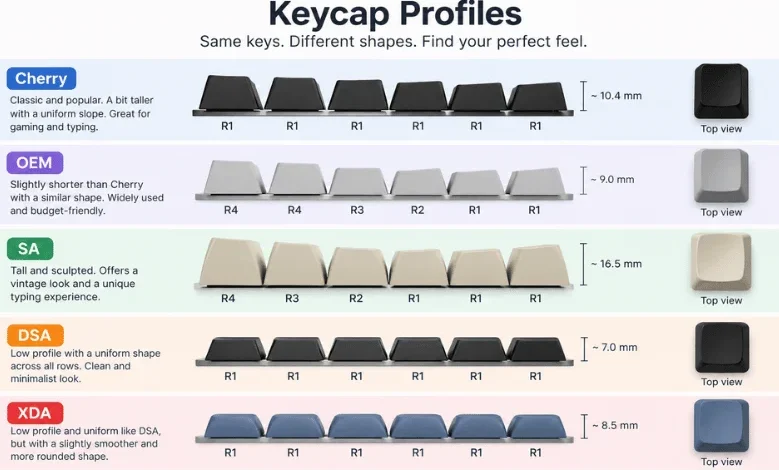
Choosing keycaps involves more than finding a color that matches your setup. Keycap profiles change key height, surface shape, typing angle, and finger movement. They can also influence how your keyboard sounds and feels during long sessions.
A profile describes the physical shape and height of keycaps across a keyboard. Common options include Cherry, OEM, SA, DSA, XDA, MT3, and KAT. Your ideal choice depends on typing habits, keyboard layout, comfort, and preferred sound.
Keycap Profile Comparison at a Glance
| Profile | Relative Height | Row Design | Top Shape | Good Fit For |
|---|---|---|---|---|
| Cherry | Low | Sculpted | Cylindrical | Typing, gaming, everyday use |
| OEM | Medium | Sculpted | Cylindrical | Beginners and familiar stock feel |
| SA | Tall | Sculpted | Spherical | Retro builds and deeper sound |
| DSA | Low | Uniform | Spherical | Custom layouts and compact boards |
| XDA | Low-medium | Uniform | Wide, shallow dish | Ortholinear boards and modern builds |
| MT3 | Tall | Sculpted | Deep spherical | Typists who like pronounced finger guidance |
| KAT | Medium-tall | Sculpted | Spherical | Users wanting height without full SA proportions |
Quick answer: Cherry and OEM suit most people because their sculpted rows provide familiar finger guidance. DSA and XDA offer uniform rows that work well with unusual layouts. SA and MT3 provide taller, deeper shapes for users who prefer stronger finger positioning and a more resonant sound.
What Are Keycap Profiles?
A keycap profile defines the height, angle, and top surface of a set of keys. Some designs change shape from one keyboard row to another. Others use almost identical shapes across every row.
These differences affect how your fingers move between letters, numbers, and modifiers. A taller cap can create a different wrist angle than a shorter design. The space inside a taller cap can also change the character of each keystroke.
The profile should not be confused with keycap material. ABS and PBT describe plastics commonly used to make keycaps. Cherry, OEM, SA, and similar names describe their physical form.
Sculpted vs. Uniform Profiles
Sculpted keycaps use different heights or angles across keyboard rows. Cherry, OEM, SA, MT3, and KAT generally follow this approach. The changing shape can help your fingers identify rows without looking down.
Uniform designs use the same basic shape across most or all rows. DSA and XDA are two familiar examples. Their consistent shape makes rearranging keys much easier.
This distinction becomes important on programmable and nonstandard keyboards. Uniform caps can move between positions without creating mismatched row angles. Sculpted sets usually require each key to remain on its intended row.
Popular Keycap Profiles Compared
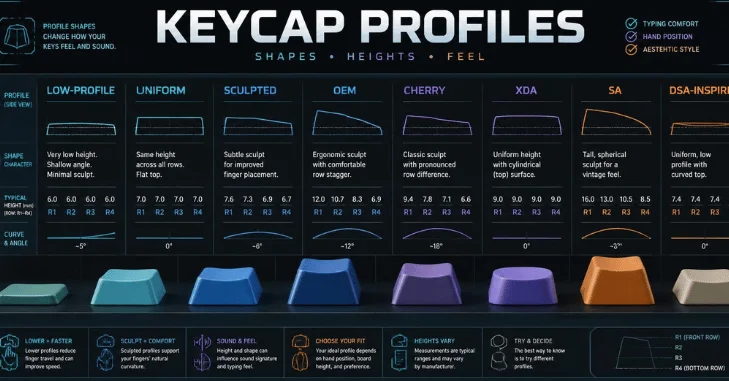
Cherry Profile
Cherry is a relatively low, sculpted design with cylindrical tops. Its rows change height and angle to guide your fingers naturally. This combination makes it popular for both everyday typing and gaming.
The lower height can feel less imposing than OEM or SA. It also keeps finger movement relatively compact between rows. People moving from a standard keyboard may need only a short adjustment period.
One compatibility detail deserves attention before buying. Some low Cherry-style caps can interfere with certain north-facing switch configurations. Check your keyboard and keycap manufacturer’s compatibility information before ordering a set.
OEM Profile
OEM is the shape many people recognize from prebuilt mechanical keyboards. It uses sculpted rows and cylindrical key surfaces, much like Cherry. OEM caps are generally taller, giving the keyboard a more familiar stock feel.
This profile makes sense for someone who doesn’t want a dramatic change. Its moderate height works well for general typing and gaming. It can also be an easy starting point for a first custom keyboard.
Peripheral comfort involves more than the keyboard itself. TechZena’s trackball mouse guide covers another way to rethink a desktop setup. Combining comfortable input devices can make long work sessions easier to manage.
SA Profile
SA keycaps are tall, sculpted, and visually distinctive. Their spherical tops create a deeper dish around each fingertip. The substantial height also gives custom keyboards a strong retro appearance.
Tall caps contain more internal space than lower designs. That construction can contribute to a fuller, more resonant sound. Material, switches, case design, and mounting style still influence the final result.
The extra height isn’t ideal for every person. Some users may prefer a wrist rest or a different hand position. Trying SA before buying an expensive set can help you judge the height.
DSA Profile
DSA is a short, uniform design with spherical tops. Each row uses the same basic shape rather than a traditional sculpt. This creates a flat, consistent appearance across the board.
The uniform design makes DSA useful for unusual keyboard layouts. Keys can move between rows without disrupting a row-specific sculpt. That flexibility suits programmable, ortholinear, and compact layouts.
DSA may feel different if you rely on row angles while touch typing. Your fingers receive fewer physical clues about their position. Give yourself time to adjust before deciding whether the profile works for you.
XDA Profile
XDA is another uniform design, but its tops feel broad and relatively shallow. Its height remains moderate compared with taller choices. The result is a clean appearance that works well on modern custom builds.
Like DSA, XDA makes rearranging keys easier. This can be useful on keyboards with unconventional layouts or frequently remapped keys. Wider tops can also feel spacious under your fingertips.
The flatter arrangement doesn’t guide fingers like a sculpted set. Touch typists may notice this difference more than casual users. Layout preference should therefore matter as much as appearance.
MT3 Profile
MT3 uses tall, sculpted rows and deeply dished key surfaces. The pronounced tops help center each fingertip during a press. Its shape feels considerably different from flatter Cherry or XDA sets.
This design often appeals to people who enjoy deliberate typing feedback. Its height and deep dishes provide strong physical cues between keys. Those same characteristics can require more adjustment for new users.
MT3 is worth considering when typing feels more important than familiarity. It isn’t automatically more comfortable for every hand. Personal preference remains important with any tall profile.
KAT Profile
KAT combines sculpted rows with spherical surfaces and a medium-tall form. It offers more height than many mainstream sets without copying SA exactly. That middle position can appeal to people exploring taller keycaps.
Its sculpt gives your fingers row-to-row guidance. The spherical surfaces also create a distinct contact point under each fingertip. It can suit users who find low profiles too flat.
Availability varies between manufacturers and individual keycap sets. Always confirm that a kit includes every key your layout requires. This matters especially for compact keyboards and unusual modifier sizes.
How Keycap Height and Shape Affect Sound
Keycaps help shape a keyboard’s acoustic character, but profile isn’t the only factor. Taller caps have larger cavities that can create more resonance. Lower caps often sound tighter because they contain less internal space.
Material and thickness can change the result substantially. Switches, stabilizers, plates, cases, desk mats, and mounting systems also affect sound. Don’t buy a profile expecting it to guarantee one specific sound.
Think of sound as the result of the entire keyboard assembly. Profile changes one part of that system. Comparing recordings can help, but your own board may produce different results.
How to Choose the Right Profile
Start with the keyboard you already enjoy using. If a standard prebuilt board feels comfortable, OEM offers the smallest departure. Cherry can provide a lower sculpt while retaining familiar row guidance.
Choose DSA or XDA if layout flexibility matters most. Their uniform rows simplify key rearrangement on custom and programmable boards. They also produce the flat visual style many compact-keyboard owners prefer.
Consider SA, MT3, or KAT if you want stronger physical shaping. These taller designs make the keycaps a more noticeable part of the typing experience. Testing a small sample can prevent an expensive purchase you later dislike.
Your desk setup can influence comfort as well. A tall keyboard may encourage a different wrist position than a slimmer board. TechZena’s computer hardware coverage offers additional information about maintaining the equipment around your setup.
Compatibility Checks Before Buying
Profile doesn’t tell you whether a keycap set fits every keyboard. First, check the stem system used by your switches. Standard MX-style stems support many aftermarket sets, while low-profile systems may require specialized caps.
Next, inspect your keyboard layout and key sizes. Compact boards can use unusual right-shift, spacebar, or modifier dimensions. A set advertised for a full-size keyboard may still lack the exact caps you need.
Also confirm row compatibility when buying sculpted designs. Moving a sculpted key into the wrong row can change its height and angle. Uniform sets avoid much of this issue because their rows share the same form.
Hardware compatibility checks can prevent unnecessary replacements and troubleshooting. TechZena’s laptop battery health guide follows the same practical approach of checking specifications before replacing hardware. That habit is useful across computer upgrades.
Which Keycap Profile Is Best for Gaming?
There is no universal gaming profile because comfort and muscle memory differ. Cherry and OEM are sensible starting points because both provide sculpted row guidance. Their familiar geometry can reduce the adjustment required after changing keycaps.
Competitive players should prioritize consistency rather than chasing a specific profile name. A new shape can initially change how quickly you locate nearby keys. Give your hands enough time to adapt before judging performance.
Uniform options can work well for gaming too. XDA or DSA may suit someone who already prefers flatter keyboards. The better choice is the profile that lets you reach controls comfortably.
Which Profile Is Best for Typing?
Many touch typists prefer sculpted rows because each row has a distinct physical position. Cherry and OEM offer this guidance without extreme height. MT3 provides much stronger fingertip shaping for users who enjoy deep dishes.
Uniform profiles provide a different experience rather than an inferior one. Some typists enjoy the consistent surface of DSA or XDA. They can be especially practical on ortholinear or customized layouts.
Comfort should decide the final choice. Hand size, wrist position, desk height, and typing technique all matter. No single design can suit every person equally.
Frequently Asked Questions About Keycap Profiles
What are the most common keycap profiles?
Cherry, OEM, SA, DSA, and XDA are among the most widely discussed options. MT3 and KAT are also common in enthusiast keyboard communities. Each uses a different combination of height, sculpting, and top shape.
Are Cherry or OEM keycaps better?
Neither profile is automatically better for every user. Cherry is generally lower, while OEM is taller and familiar from many prebuilt keyboards. Both use sculpted rows that provide physical guidance while typing.
Do keycap shapes affect typing speed?
A different shape can temporarily affect your accuracy or rhythm while you adapt. There isn’t one profile that guarantees faster typing for everyone. Familiarity and individual technique often matter more than the profile name.
Do taller keycaps sound deeper?
Taller caps can add more resonance because their internal cavities are larger. Material, thickness, switches, and keyboard construction also change the final sound. Height alone cannot guarantee a particular acoustic result.
Can any keycaps fit any mechanical keyboard?
No, physical profile and switch compatibility are separate concerns. You must check stem type, layout, key sizes, and kit coverage before buying. Low-profile switches often require caps designed specifically for their mounting system.
Final Takeaway
Start with Cherry or OEM if you want familiar sculpted rows and an easy transition. Consider DSA or XDA for flexible layouts, while SA, MT3, and KAT offer taller shapes. The right choice should match your hands, layout, and daily typing habits.
Don’t choose from appearance alone. Check switch compatibility, key sizes, row requirements, and keyboard height before spending money. A well-matched set can make an existing keyboard feel noticeably different without replacing the board.