

During intensive use, the CPU and GPU generate significant heat, which requires an efficient cooling system to prevent overheating and maintain optimal performance. Thermal paste is a crucial element of this cooling mechanism.
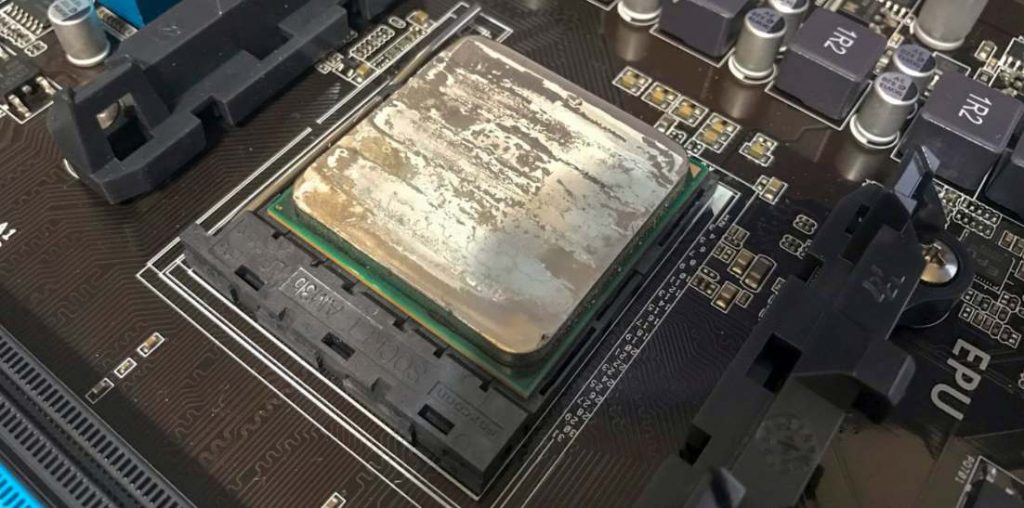
Typically, thermal paste dries out and loses its effectiveness after about three to four years, leading to decreased CPU/GPU performance. This is when our thermal paste comes to expire thermal paste replacement service becomes essential.
Selecting the right thermal paste and applying it correctly can drastically improve your PC’s thermal management and overall performance. Using improper thermal paste or incorrect application techniques, however, can lead to inadequate cooling and poor system stability. In this article, you’ll learn about the various types of thermal compounds and how to apply them properly. Whether you’re a beginner or an experienced professional, there’s valuable information here to enhance your understanding.
What Is Thermal Paste and Its Uses?
When under heavy workload, both GPU and CPU generate substantial heat that must be effectively dissipated to prevent hardware damage and maintain performance. The heatsink transfers heat away from the processor; however, the microscopic uneven surfaces between the CPU/GPU and heatsink create air gaps. Since air is a poor heat conductor, thermal paste is applied to fill these gaps, enhancing the thermal conductivity and improving heat transfer efficiency.
Also known as thermal compound, thermal paste is a viscous material composed of conductive substances such as silicon, metal oxides, ceramics, or carbon particles. These materials help bridge the micro-gaps between the CPU/GPU and the heatsink to facilitate effective heat dissipation.
How To Choose the Right Thermal Paste for Your CPU/GPU
Most CPU coolers come with pre-applied thermal paste on the heatsink. However, many PC enthusiasts and gamers prefer to remove this factory-applied paste and replace it with a higher-quality thermal compound. Factory-applied thermal paste may have been sitting for an unknown duration, which can reduce its effectiveness.
If your system is experiencing higher temperatures during gaming or graphics-intensive tasks than it did when new, it’s likely that the thermal paste has dried out and lost its heat-conducting properties. In such cases, carefully removing the heatsink, cleaning the old thermal compound, clean thermal paste off CPU and applying fresh thermal paste can restore optimal cooling.
There are four main types of thermal pastes available today: metal-based, ceramic-based, carbon-based, and silicone-based. Each type offers unique properties that should be considered based on your cooling needs and system setup.
Metal-based Compounds
Metal-based thermal pastes generally offer the highest thermal conductivity, using metals such as silver, zinc, aluminum, or copper. This category is highly favored by gamers and performance PC builders for its superior heat transfer capabilities.
However, metal-based compounds are electrically conductive, which poses a risk of short circuits if the paste is applied improperly or spills onto sensitive components. Exercise caution to avoid contact with CPU sockets or circuit boards during application.
Ceramic-based Compounds
Ceramic-based thermal pastes do not conduct electricity, making them safer for users concerned about accidental shorts. Although their thermal conductivity is typically lower than metal-based pastes, they are still widely used due to their safety and affordability.
Carbon-based Compounds
Containing fine carbon particles, carbon-based thermal pastes provide a good balance of thermal conductivity and electrical non-conductivity, offering safer use without compromising much on cooling efficiency.
Silicone-based Compounds
Often integrated into thermal pads, silicone-based compounds are easy to apply and electrically insulating. However, they offer lower thermal transfer efficiency and are typically used in applications where convenience and safety are prioritized over maximum cooling.
Popular Thermal Pastes to Consider
To guide you in selecting the right thermal paste, here are some top-rated thermal compounds widely trusted by PC builders:
- Arctic Silver 5: A metal-based thermal compound consisting of microscopic silver particles, offering excellent thermal conductivity of 8.5 W/mK.
- Thermalright Thermal Pad: A silicone-based thermal pad measuring 85x45x1mm with a thermal conductivity rating of 12.8 W/mK, suitable for easier installations.
- Arctic Silver CMQ2-2.7G: A high-density ceramic-based thermal compound designed for high-performance CPUs and liquid cooling systems.
- Arctic MX-4 (2019 Version): A carbon-based paste known for being electrically non-conductive, making it safe and effective with a thermal conductivity of 8.5 W/mK.
Final Thoughts
With countless thermal paste options available, choosing the best one for your CPU or GPU cooling can feel overwhelming. Focus on the primary factors mentioned above—thermal conductivity, electrical conductivity, safety, and compatibility—to select a paste that matches your requirements.
Choosing the right thermal paste not only supports optimal system performance but also extends your PC’s lifespan and stability under heavy workloads.
For additional insights on Hosted PBX: The Smart Choice for Modern Business Communications, be sure to visit our Motherboards category for comprehensive guides and tips.
In recent years, the thermal paste industry has seen significant innovation, with manufacturers developing compounds that balance high thermal conductivity and electrical insulation. Advances such as nano-particle enhanced pastes offer improved thermal efficiency without compromising user safety. Moreover, proper application techniques—such as using pea-sized amounts or spread-methods—are emphasized in contemporary PC building to maximize heat transfer and prevent paste spillage. Regular maintenance and reapplication of thermal paste every few years are recommended to sustain peak thermal performance, especially for users with overclocked systems or intensive workloads.

